In the fast-paced world of the restaurant industry, finding reliable and skilled workers for last-minute shifts can be a challenge. Enter ShiftCover, the innovative mobile application that leverages artificial intelligence to simplify and expedite the process of hiring workers for your restaurant shifts. This step-by-step guide will walk you through the seamless process of using ShiftCover to hire the perfect worker for your immediate staffing needs.
Step 1: Download and Install the ShiftCover App
Begin by downloading the ShiftCover app from the App Store or Google Play Store. Once downloaded, install the app on your mobile device.
Step 2: Create Your ShiftCover Account
Open the app and create your ShiftCover account. Provide essential details about your restaurant, such as location. You will be required to confirm your payment information before being allowed to post a Shift.
Step 3: Select a Date
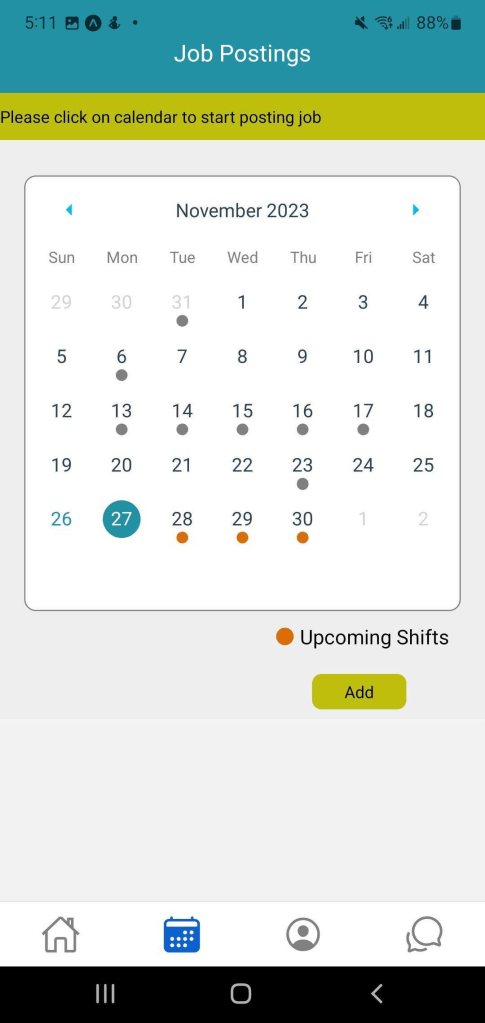
Navigate to the Calendar section within the app. Tap on a date on the Calendar, and tap the Add Shift button that appears.
Step 4: Specify Shift Requirements
Use the app’s intuitive interface to fill in the details of the shift you need to cover, including date, time, # of positions available, and any additional details you may find relevant, such as special footwear requirements.

Step 5: View Available Applications
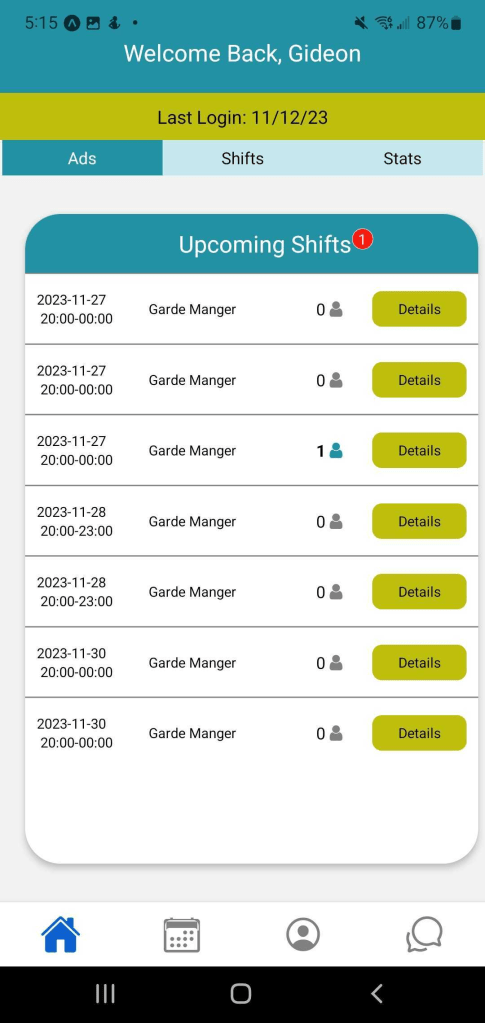
Sit back as ShiftCover does the heavy lifting. The app will present you with a list of available, skilled workers who match your criteria. Each worker profile includes relevant details, such as experience, ratings, and reviews.
Step 6: Choose the Perfect Candidate
Browse through the list of available workers and select the one that best fits your needs. Explore their profiles, reviews from other employers, and any additional information provided by the workers.

Step 7: Confirm and Finalize
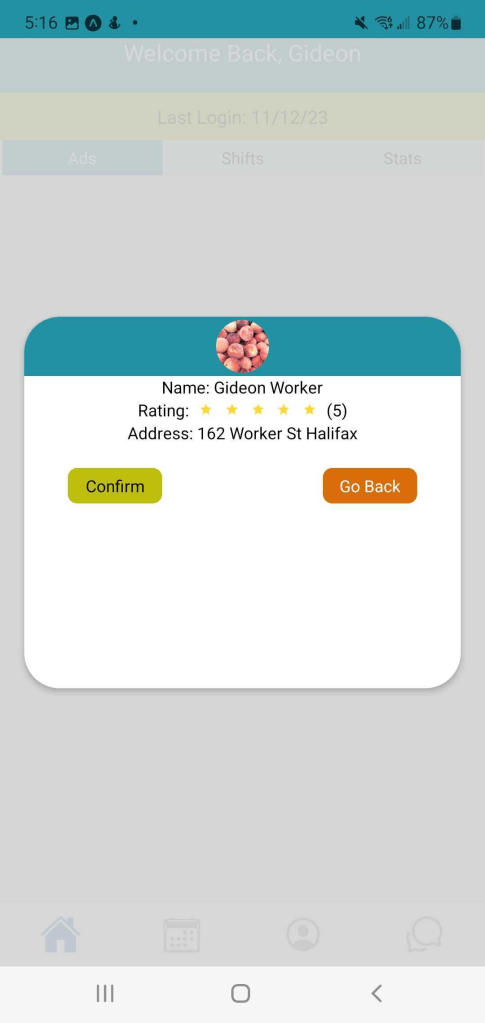
Once you’ve identified the perfect candidate, confirm the selection and finalize the hiring process. The selected worker will be notified instantly, ensuring a quick response and confirmation for the shift.
Step 8: Communication
Use the in-app messaging feature to communicate with the hired worker. Discuss any specific details, provide additional instructions, and ensure a smooth transition for the upcoming shift.
Step 9: Rate and Review
After the shift is completed, take a moment to rate and review the worker. This feedback helps build a trustworthy community within ShiftCover and benefits both restaurateurs and skilled workers.
Conclusion:
Congratulations! You’ve successfully hired a worker for your shift using ShiftCover. With its user-friendly interface and powerful AI capabilities, ShiftCover revolutionizes the way you manage your staffing needs in the dynamic restaurant industry. Say goodbye to staffing challenges and hello to a seamless and efficient hiring process. Download ShiftCover today and experience the future of on-demand staffing.
 Alykyta